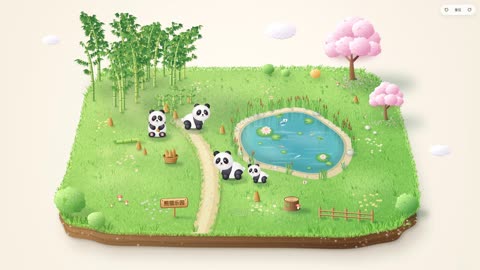
대나무와 벚나무 사이 판다 연못
Panda pond scene with bamboo and cherry trees
Wan 3.0Text-to-videotiltshiftcloseup
결과
제작 · EianLu · 영상과 장면의 저작권은 제작자에게 있으며, 원작 주소에서 불러옵니다. 원작 보기
대나무와 벚나무가 있는 연못가 판다 풍경 영상
프롬프트 원문
Create a soothing interactive mini-toy using a single HTML file + Canvas 2D (no image assets needed).

[User fills in]

- Main character animal: ____ (e.g., baby panda / corgi puppy / little lamb / duckling)

- Main character appearance details: ____ (e.g., black-and-white coloring, black eye patches; if left blank, default to the cutest features of that animal)

- Main character's actions: walking + ____ (e.g., sitting and munching bamboo shoots / wagging tail / swimming; can list 2–3)

- Scene theme: ____ (e.g., bamboo grove meadow / beach shore / snowy pine forest)

- Objects in the scene: ____ (e.g., bamboo grove, bamboo shoots, pond, cherry blossom tree, wooden sign; suggest 8–12 items)

- Text on the wooden sign: ____ (can leave blank)

[Visuals]

On a cream-colored paper background floats a miniature terrain platform, viewed from a 3/4 overhead angle with lots of white space around. The platform is a rounded square, exposing about 50px of cross-section thickness; the cross-section material should match the scene (soil layers / sand layers / ice layers, with layering and details). Fill the ground texture according to the scene theme, place the scene objects on it, and add pebbles, little flowers, and grass as accents to make the image full but not cluttered.

Style should be cute, soothing, full, and three-dimensional:

- Build all objects from radially gradient spheres lit from the upper left, with soft shadows and contact shadows; trees, bushes, clouds made of lots of small bumpy shapes with light and dark variations

- Ground uses tens of thousands of short brush strokes plus color block mottling—don't flat-fill

- Tall things (trees, bamboo, pillars) must be drawn complete, with tops and tips, not cut off by the frame; balance the visual weight on left and right sides

- Finally add tilt-shift blur, slight boost in contrast and saturation, warm-to-cool soft light gradient

- Default to bright colors; only dark scenes like nightscapes should be dim

[Main Character]

Chubby, roly-poly baby build: big head, round body, short limbs, big eyes with highlights, blushing cheeks, gentle expression. Eye-area patterns or patches should droop outward and downward—don't make them upturned, or it'll look fierce. Fur edges only with short, soft strokes—no fur on limbs or feet. Every action should be instantly recognizable at a glance (e.g., body level when walking, legs alternating), and it should blink.

[Interactions]

- Draw a circle on the ground with the mouse; a main character pops out in the circle (easeOutBack bounce + star particles)—bigger circle means bigger character; if drawn in water or dense bushes where it can't stand, prompt "Try drawing a circle on some open ground instead." Max 30 characters.

- Characters wander idly near their own circle, randomly doing various actions; they won't enter water or pass through obstacles, and they'll step aside for each other; smaller ones will follow bigger ones.

- Drag characters (they lift off the ground when grabbed). If dropped in an unstandable spot, auto-move to the nearest open ground—don't bounce back to original spot. Select and hit Delete to remove.

- Drag blank space outside the platform or right-click drag to rotate the view: left-right for rotation, up-down for pitch. Top-right has ±45° and reset buttons; keyboard ← → also rotates.

- Add a few moving little things in the scene, like flying or floating ones, water ripples—whatever matches the scene theme.

[Technical Requirements]

- Ground uses u,v ∈ [0,1] coordinates with a perspective camera (yaw + pitch); platform auto-scales on view change to always fit fully in the frame.

- Two layers: Ground layer repaints once per view change; vertical objects pre-rendered as small images at fixed view (auto-crop transparent edges), then positioned by camera, scaled by distance, and sorted with main character by screen y from back to front—so characters can walk behind objects. Dense tree groves broken into individual tree small images.

- Obstacles judged by circular footprints on the ground; character positions also in u,v coordinates, independent of view.

- Don't use ctx.filter blur every frame (way too slow). Dynamic shadows via radial gradients instead; during rotation, use draft quality without blur, switch to full quality and fade in after release. Blur radius doesn't auto-scale—manually multiply by render scale.

- Keep 60fps with about 10 characters on screen at once; adapt to window scaling and mobile screens.

[Process]

1. Start with just the static scene—output 2–3 sample images for my approval: one full panorama, one close-up of main character in various poses.

2. After I approve, build the interactive version; test it yourself in the browser once done—check circle-drawing, dragging, deleting, and rotating, confirm no errors.
모음 출처 · github.com